# Overview
Spring ComponentMap – a JVM library that provides a simple way to inject a map of beans by type.
 [](https://circleci.com/gh/krud-dev/spring-componentmap/tree/master) [](https://codecov.io/gh/krud-dev/spring-componentmap) [](https://github.com/krud-dev/spring-componentmap/blob/master/LICENSE) [](https://github.com/krud-dev/spring-componentmap/issues)
The library does one simple thing. It allows better injection of maps of beans. With the library:
* The map key type could be **any type** (string, enum, integer...) and with **any value**. \
Unlike Spring implementation which only allows to inject maps with string keys and their value is the bean name.
* The map value type can be either the **bean type** or **list of the bean type**. \
Unlike Spring implementation which does not support lists.
Check out the quick start guide to learn how get started:
{% content-ref url="/pages/MJrDRMyYWzKKWX4Pvwkb" %}
[Quick Start](/introduction/quick-start)
{% endcontent-ref %}
# Installation
Adding Spring ComponentMap to your project.
## Installation
To get started, install the library via `Maven` or `Gradle`:
### Maven
```xml
dev.krudspring-componentmap0.1.0
```
### Gradle
#### Groovy DSL
```groovy
implementation 'dev.krud:spring-componentmap:0.1.0'
```
#### Kotlin DSL
```kotlin
implementation("dev.krud:spring-componentmap:0.1.0")
```
## Requirements
* Minimum supported Java version: 1.8
* Spring Boot 2.5.0+
# Quick Start
In this quick start guide, we'll review a simple use-case for Spring ComponentMap, injecting a map of beans.
{% hint style="info" %}
Before getting started, make sure you have followed the installation steps outlined in the [Installation guide](/introduction/installation).
{% endhint %}
## Bean Interface
We start by defining the interface of the map value beans `ActionHandler`. The injected map will be of type `Map.`
{% tabs %}
{% tab title="Kotlin" %}
```kotlin
interface ActionHandler {
/**
* The action that this handler can handle, add the `@ComponentMapKey` annotation to the getter in order to register it
*/
@get:ComponentMapKey
val type: String
fun handle()
}
```
{% endtab %}
{% tab title="Java" %}
```java
public interface ActionHandler {
/**
* The action that this handler can handle, add the `@ComponentMapKey` annotation to the getter in order to register it
*/
@ComponentMapKey
String getType();
void handle();
}
```
{% endtab %}
{% endtabs %}
The `@ComponentMapKey` annotation defines the method that returns the keys of the map, therefore its return type is the type of the map's key.
We will continue by implementing a few `ActionHandler` beans:
{% tabs %}
{% tab title="Kotlin" %}
```kotlin
@Component
class ActionHandler1 : ActionHandler {
override val type = "type1"
override fun handle() {
println("ActionHandler1")
}
}
@Component
class ActionHandler2 : ActionHandler {
override val type = "type2"
override fun handle() {
println("ActionHandler2")
}
}
```
{% endtab %}
{% tab title="Java" %}
```java
@Component
public class ActionHandler1 implements ActionHandler {
@Override
public String getType() {
return "type1";
}
@Override
public void handle() {
System.out.println("ActionHandler1");
}
}
@Component
public class ActionHandler2 implements ActionHandler {
@Override
public String getType() {
return "type2";
}
@Override
public void handle() {
System.out.println("ActionHandler2");
}
}
```
{% endtab %}
{% endtabs %}
## Injecting The Map
Injecting the map is as simple as adding `@ComponentMap` annotation to map.
{% tabs %}
{% tab title="Kotlin" %}
```kotlin
@Component
class ActionHandlerMap {
/**
* The `@ComponentMap` annotation will automatically populate this map with all beans of type `ActionHandler`
*/
@ComponentMap
private lateinit var handlers: Map
fun handle(type: String) {
handlers[type]?.handle()
}
}
```
{% endtab %}
{% tab title="Java" %}
```java
@Component
public class ActionHandlerMap {
/**
* The `@ComponentMap` annotation will automatically populate this map with all beans of type `ActionHandler`
*/
@ComponentMap
private Map handlers;
public void handle(String type) {
handlers.get(type).handle();
}
}
```
{% endtab %}
{% endtabs %}
That's it! We have injected a map with our own keys. Simple and easy.
## Code Examples
Additional code examples are available [here](https://github.com/krud-dev/spring-componentmap/tree/master/spring-componentmap/src/test/kotlin/dev/krud/spring/componentmap/examples).
# Component Map
The complete API consists of 2 annotations.
## `@ComponentMapKey`
The `@ComponentMapKey` annotation defines the method that returns the keys of the map. The annotated method return type is the type of the map's key.
{% tabs %}
{% tab title="Kotlin" %}
```kotlin
enum class CalculatorOperationType {
ADD, SUBTRACT, MULTIPLY, DIVIDE
}
internal interface CalculatorOperation {
@get:ComponentMapKey
val operationType: CalculatorOperationType
fun calculate(a: Int, b: Int): Int
}
```
{% endtab %}
{% tab title="Java" %}
```java
public enum CalculatorOperationType {
ADD, SUBTRACT, MULTIPLY, DIVIDE
}
public interface CalculatorOperation {
@ComponentMapKey
CalculatorOperationType getOperationType();
int calculate(int a, int b);
}
```
{% endtab %}
{% endtabs %}
Lets implement few operations:
{% tabs %}
{% tab title="Kotlin" %}
```kotlin
internal class AddOperation : CalculatorOperation {
override val type: CalculatorOperationType = CalculatorOperationType.ADD
override fun calculate(a: Int, b: Int): Int {
return a + b
}
}
internal class MultiplyOperation : CalculatorOperation {
override val type: CalculatorOperationType = CalculatorOperationType.MULTIPLY
override fun calculate(a: Int, b: Int): Int {
return a * b
}
}
```
{% endtab %}
{% tab title="Java" %}
```java
public class AddOperation implements CalculatorOperation {
@Override
public CalculatorOperationType getOperationType() {
return CalculatorOperationType.ADD;
}
@Override
public int calculate(int a, int b) {
return a + b;
}
}
public class MultiplyOperation implements CalculatorOperation {
@Override
public CalculatorOperationType getOperationType() {
return CalculatorOperationType.MULTIPLY;
}
@Override
public int calculate(int a, int b) {
return a * b;
}
}
```
{% endtab %}
{% endtabs %}
No annotations or any library specific code is required in the implementations.
## @ComponentMap
{% hint style="info" %}
Component Maps can only be injected into properties, other injection methods are not supported.
{% endhint %}
Add the `@ComponentMap` annotation to map to inject.
{% tabs %}
{% tab title="Kotlin" %}
```kotlin
class CalculatorServiceImpl : CalculatorService {
@ComponentMap
private lateinit var operations: Map
override fun calculate(type: CalculatorOperationType, a: Int, b: Int): Number {
val operationHandler = operations[type] ?: throw IllegalArgumentException("Unknown operation type: $type")
return operationHandler.calculate(a, b)
}
}
```
{% endtab %}
{% tab title="Java" %}
```java
public class CalculatorServiceImpl implements CalculatorService {
@ComponentMap
private Map operations;
@Override
public int calculate(CalculatorOperationType type, int a, int b) {
CalculatorOperation operationHandler = operations.get(type);
if (operationHandler == null) {
throw new IllegalArgumentException("Unknown operation type: $type");
}
return operationHandler.calculate(a, b);
}
}
```
{% endtab %}
{% endtabs %}
The `@ComponentMap` annotation can also inject list of beans to the map value:
{% tabs %}
{% tab title="Kotlin" %}
```kotlin
@ComponentMap
private lateinit var operations: Map>
```
{% endtab %}
{% tab title="Java" %}
```java
@ComponentMap
private Map> operations;
```
{% endtab %}
{% endtabs %}
By defining the value of the map as `List` of beans the library will add all the beans of each key to their relevant list.
For example if you have multiple `AnnouncementSubscriber` for each `AnnouncementType` just change the type of the map value to `List` and for each `AnnouncementType` the list will contain multiple subscribers.
{% tabs %}
{% tab title="Kotlin" %}
```kotlin
@ComponentMap
private lateinit var subscribers: Map>
```
{% endtab %}
{% tab title="Java" %}
```java
@ComponentMap
private Map> subscribers;
```
{% endtab %}
{% endtabs %}
# Strategy Pattern
What is it and how to use it to improve your code.
## What is it?
According to [Wikipedia](https://en.wikipedia.org/wiki/Strategy_pattern), the strategy pattern is a behavioral software design pattern that enables selecting an algorithm at runtime. Instead of implementing a single algorithm directly, code receives run-time instructions as to which in a family of algorithms to use.
In simple words, the strategy pattern is used to specify how something should be done by providing a specific algorithm.\
For example, a strategy for payment could be Credit Card, PayPal, or any other payment provider.
## Why should we use it?
The Strategy Pattern defines a family of algorithms, encapsulates each one, and makes them interchangeable. Strategy lets the algorithm vary independently from clients that use it ([source](https://fjp.at/design-patterns/strategy)).
In short, it makes our code cleaner, easier to maintain, and reusable.
## The Strategy Pattern in Code
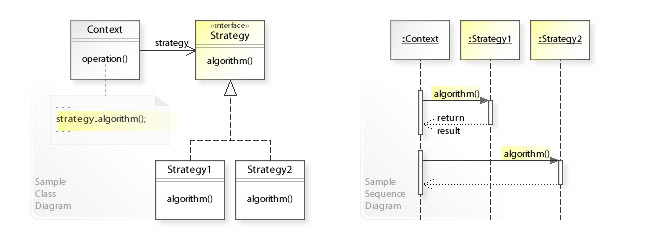
Implementations of the pattern consist of an interface defining the strategy, multiple concrete implementations of the strategy and a context using the strategy.
By Vanderjoe - Own work, CC BY-SA 4.0, https://commons.wikimedia.org/w/index.php?curid=60733582
## Code Example
Let's look at the following simplified scenario:
* We have an application with users and we need to send them verification codes for 2FA.
* The application supports multiple communication options for receiving the verification code: Email, SMS, Notifications...
* Each user selects its preferred communication method.
We will start by implementing the strategy pattern **without** Spring and the library. First we will define our strategy interface:
```kotlin
interface VerificationCodeCommunicationStrategy {
fun sendVerificationCode(user: User, code: String)
}
```
Now let's add our implementations:
```kotlin
class EmailCommunicationStrategy : VerificationCodeCommunicationStrategy {
override fun sendVerificationCode(user: User, code: String) {
emailClient.sendEmail(user.email, "Verification code", "Your verification is $code.")
}
}
class SmsCommunicationStrategy : VerificationCodeCommunicationStrategy {
override fun sendVerificationCode(user: User, code: String) {
smsClient.sendSMS(user.phone, "Your verification is $code.")
}
}
// ...
```
All that's left is to use the strategy.
```kotlin
enum class CommunicationMethod {
Email, SMS, Notification
}
class VerificationCodeService {
val verificationCodeStrategyMap: Map = mapOf(
CommunicationMethod.Email to EmailCommunicationStrategy(),
CommunicationMethod.SMS to SmsCommunicationStrategy(),
// ...
)
fun sendVerificationCode(user: User) {
val code = generateVerificationCode()
val verificationCodeStrategy = verificationCodeStrategyMap[user.preferredCommunicationMethod]
verificationCodeStrategy?.sendVerificationCode(user, code)
}
}
```
We can see how the code is clean and easy to maintain. Adding a new communication method would be easy and will not need to change existing code other than adding it to the map of strategies.
### Code Example WITHOUT the library
Let's revise the previous example for a regular Spring Boot implementation.
When using the strategy pattern in a Spring Boot application the context and strategy implementations are usually Spring components.
We will start with the strategies:
```kotlin
interface VerificationCodeCommunicationStrategy {
fun sendVerificationCode(user: User, code: String)
}
@Component
class EmailCommunicationStrategy : VerificationCodeCommunicationStrategy {
override fun sendVerificationCode(user: User, code: String) {
emailClient.sendEmail(user.email, "Verification code", "Your verification is $code.")
}
}
@Component
class SmsCommunicationStrategy : VerificationCodeCommunicationStrategy {
override fun sendVerificationCode(user: User, code: String) {
smsClient.sendSMS(user.phone, "Your verification is $code.")
}
}
// ...
```
The interface remains the same and the implementations receive the `@Component` annotation.
Now let's move on to the verification service.
```kotlin
@Service
class VerificationCodeServiceImpl(
private val emailCommunicationStrategy: EmailCommunicationStrategy,
private val smsCommunicationStrategy: SmsCommunicationStrategy
) {
private val verificationCodeStrategyMap: Map = mapOf(
CommunicationMethod.Email to emailCommunicationStrategy,
CommunicationMethod.SMS to smsCommunicationStrategy
)
fun sendVerificationCode(user: User) {
val code = generateVerificationCode()
val verificationCodeStrategy = verificationCodeStrategyMap[user.preferredCommunicationMethod]
verificationCodeStrategy?.sendVerificationCode(user, code)
}
}
```
We need to add the strategy implementations to the constructor and build the map manually. That's no fun!
### Code Example WITH the library
The entire objective of the library is to make our life easier and the code cleaner and less bug prone. It does it by simply building the strategy map automatically.
We will start by modifying the strategy interface.
```kotlin
interface VerificationCodeCommunicationStrategy {
@get:ComponentMapKey
val method: CommunicationMethod
fun sendVerificationCode(user: User, code: String)
}
```
As you can see we have added a new field `method` with the annotation `@ComponentMapKey`. This informs the library which field is the key for the strategy map.
Let's update the implementations according to the modified interface.
```kotlin
@Component
class EmailCommunicationStrategy : VerificationCodeCommunicationStrategy {
override val method = CommunicationMethod.Email
override fun sendVerificationCode(user: User, code: String) {
emailClient.sendEmail(user.email, "Verification code", "Your verification is $code.")
}
}
@Component
class SmsCommunicationStrategy : VerificationCodeCommunicationStrategy {
override val method = CommunicationMethod.SMS
override fun sendVerificationCode(user: User, code: String) {
smsClient.sendSMS(user.phone, "Your verification is $code.")
}
}
// ...
```
Now let's modify the service to use the library.
```kotlin
@Service
class VerificationCodeServiceImpl {
@ComponentMap
private lateinit var verificationCodeStrategyMap: Map
fun sendVerificationCode(user: User) {
val code = generateVerificationCode()
val verificationCodeStrategy = verificationCodeStrategyMap[user.preferredCommunicationMethod]
verificationCodeStrategy?.sendVerificationCode(user, code)
}
}
```
That's it! All we had to do is to add the `@ComponentMap` annotation to the strategy map and voila! The map is built automatically from the components. No boiler-plate code. To add a new strategy all you need to do is to create a new implementation and it will be "magically" added to all relevant strategy maps.