> For the complete documentation index, see [llms.txt](https://componentmap.krud.dev/llms.txt). Markdown versions of documentation pages are available by appending `.md` to page URLs; this page is available as [Markdown](https://componentmap.krud.dev/guides/strategy-pattern.md).
# Strategy Pattern
What is it and how to use it to improve your code.
## What is it?
According to [Wikipedia](https://en.wikipedia.org/wiki/Strategy_pattern), the strategy pattern is a behavioral software design pattern that enables selecting an algorithm at runtime. Instead of implementing a single algorithm directly, code receives run-time instructions as to which in a family of algorithms to use.
In simple words, the strategy pattern is used to specify how something should be done by providing a specific algorithm.\
For example, a strategy for payment could be Credit Card, PayPal, or any other payment provider.
## Why should we use it?
The Strategy Pattern defines a family of algorithms, encapsulates each one, and makes them interchangeable. Strategy lets the algorithm vary independently from clients that use it ([source](https://fjp.at/design-patterns/strategy)).
In short, it makes our code cleaner, easier to maintain, and reusable.
## The Strategy Pattern in Code
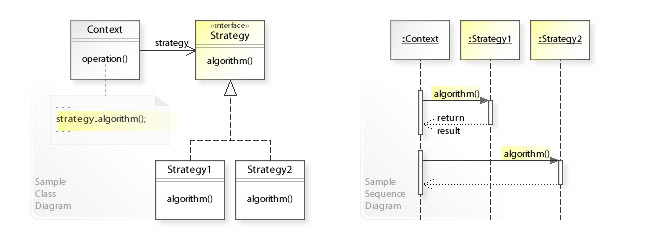
Implementations of the pattern consist of an interface defining the strategy, multiple concrete implementations of the strategy and a context using the strategy.
By Vanderjoe - Own work, CC BY-SA 4.0, https://commons.wikimedia.org/w/index.php?curid=60733582
## Code Example
Let's look at the following simplified scenario:
* We have an application with users and we need to send them verification codes for 2FA.
* The application supports multiple communication options for receiving the verification code: Email, SMS, Notifications...
* Each user selects its preferred communication method.
We will start by implementing the strategy pattern **without** Spring and the library. First we will define our strategy interface:
```kotlin
interface VerificationCodeCommunicationStrategy {
fun sendVerificationCode(user: User, code: String)
}
```
Now let's add our implementations:
```kotlin
class EmailCommunicationStrategy : VerificationCodeCommunicationStrategy {
override fun sendVerificationCode(user: User, code: String) {
emailClient.sendEmail(user.email, "Verification code", "Your verification is $code.")
}
}
class SmsCommunicationStrategy : VerificationCodeCommunicationStrategy {
override fun sendVerificationCode(user: User, code: String) {
smsClient.sendSMS(user.phone, "Your verification is $code.")
}
}
// ...
```
All that's left is to use the strategy.
```kotlin
enum class CommunicationMethod {
Email, SMS, Notification
}
class VerificationCodeService {
val verificationCodeStrategyMap: Map = mapOf(
CommunicationMethod.Email to EmailCommunicationStrategy(),
CommunicationMethod.SMS to SmsCommunicationStrategy(),
// ...
)
fun sendVerificationCode(user: User) {
val code = generateVerificationCode()
val verificationCodeStrategy = verificationCodeStrategyMap[user.preferredCommunicationMethod]
verificationCodeStrategy?.sendVerificationCode(user, code)
}
}
```
We can see how the code is clean and easy to maintain. Adding a new communication method would be easy and will not need to change existing code other than adding it to the map of strategies.
### Code Example WITHOUT the library
Let's revise the previous example for a regular Spring Boot implementation.
When using the strategy pattern in a Spring Boot application the context and strategy implementations are usually Spring components.
We will start with the strategies:
```kotlin
interface VerificationCodeCommunicationStrategy {
fun sendVerificationCode(user: User, code: String)
}
@Component
class EmailCommunicationStrategy : VerificationCodeCommunicationStrategy {
override fun sendVerificationCode(user: User, code: String) {
emailClient.sendEmail(user.email, "Verification code", "Your verification is $code.")
}
}
@Component
class SmsCommunicationStrategy : VerificationCodeCommunicationStrategy {
override fun sendVerificationCode(user: User, code: String) {
smsClient.sendSMS(user.phone, "Your verification is $code.")
}
}
// ...
```
The interface remains the same and the implementations receive the `@Component` annotation.
Now let's move on to the verification service.
```kotlin
@Service
class VerificationCodeServiceImpl(
private val emailCommunicationStrategy: EmailCommunicationStrategy,
private val smsCommunicationStrategy: SmsCommunicationStrategy
) {
private val verificationCodeStrategyMap: Map = mapOf(
CommunicationMethod.Email to emailCommunicationStrategy,
CommunicationMethod.SMS to smsCommunicationStrategy
)
fun sendVerificationCode(user: User) {
val code = generateVerificationCode()
val verificationCodeStrategy = verificationCodeStrategyMap[user.preferredCommunicationMethod]
verificationCodeStrategy?.sendVerificationCode(user, code)
}
}
```
We need to add the strategy implementations to the constructor and build the map manually. That's no fun!
### Code Example WITH the library
The entire objective of the library is to make our life easier and the code cleaner and less bug prone. It does it by simply building the strategy map automatically.
We will start by modifying the strategy interface.
```kotlin
interface VerificationCodeCommunicationStrategy {
@get:ComponentMapKey
val method: CommunicationMethod
fun sendVerificationCode(user: User, code: String)
}
```
As you can see we have added a new field `method` with the annotation `@ComponentMapKey`. This informs the library which field is the key for the strategy map.
Let's update the implementations according to the modified interface.
```kotlin
@Component
class EmailCommunicationStrategy : VerificationCodeCommunicationStrategy {
override val method = CommunicationMethod.Email
override fun sendVerificationCode(user: User, code: String) {
emailClient.sendEmail(user.email, "Verification code", "Your verification is $code.")
}
}
@Component
class SmsCommunicationStrategy : VerificationCodeCommunicationStrategy {
override val method = CommunicationMethod.SMS
override fun sendVerificationCode(user: User, code: String) {
smsClient.sendSMS(user.phone, "Your verification is $code.")
}
}
// ...
```
Now let's modify the service to use the library.
```kotlin
@Service
class VerificationCodeServiceImpl {
@ComponentMap
private lateinit var verificationCodeStrategyMap: Map
fun sendVerificationCode(user: User) {
val code = generateVerificationCode()
val verificationCodeStrategy = verificationCodeStrategyMap[user.preferredCommunicationMethod]
verificationCodeStrategy?.sendVerificationCode(user, code)
}
}
```
That's it! All we had to do is to add the `@ComponentMap` annotation to the strategy map and voila! The map is built automatically from the components. No boiler-plate code. To add a new strategy all you need to do is to create a new implementation and it will be "magically" added to all relevant strategy maps.